



Reminders
Ce guide est en anglais.
The automatic reminder on or off
Où le trouver
Où le trouverSettings → Marketing and messages → Reminders
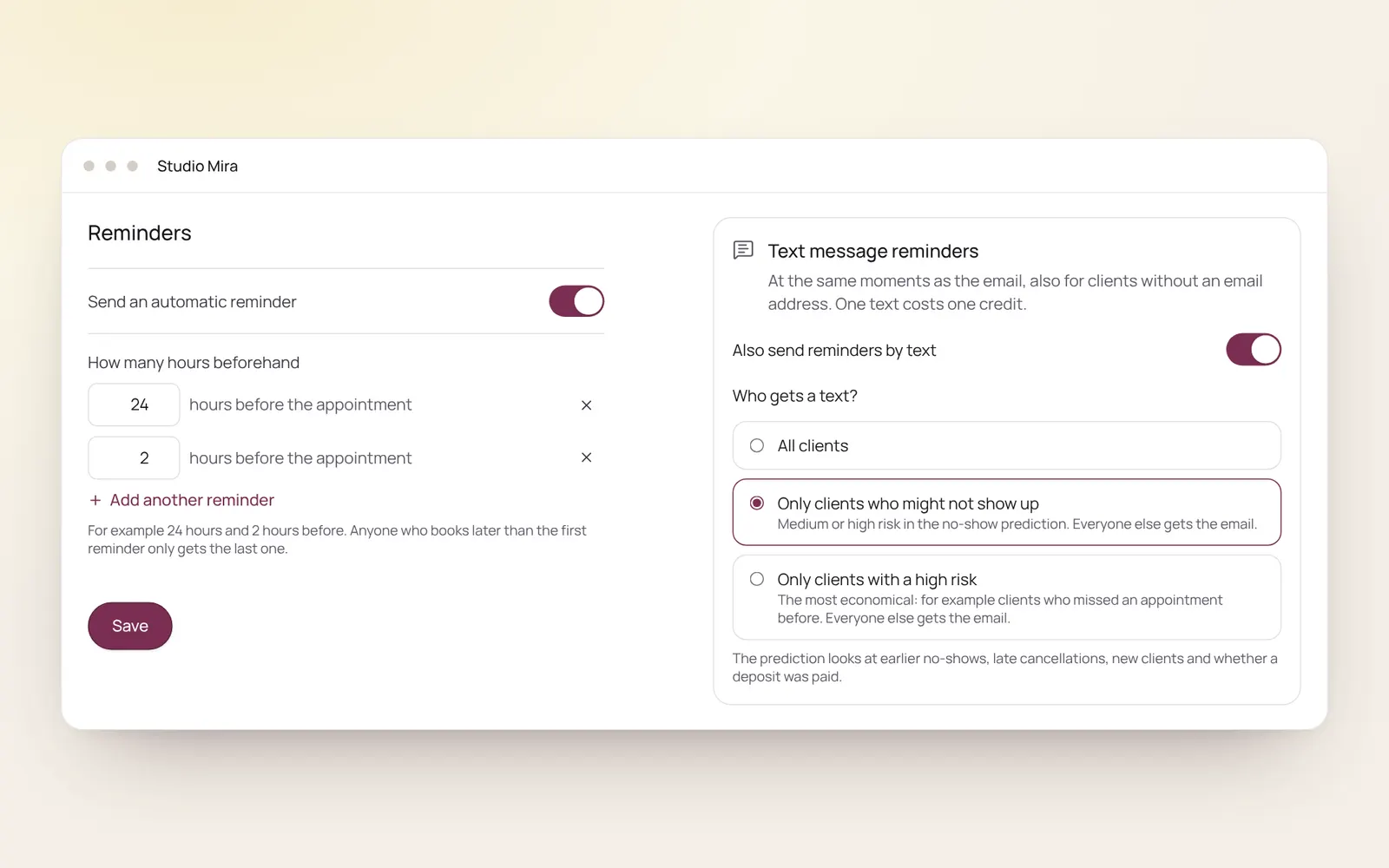
Comment ça marche
- Switch on Send automatic reminder and choose how many hours before the appointment, for example 24 hours and 2 hours.
- Add another reminder adds one more.
- Someone who books after the first reminder would have gone only gets the later one.
- What the email says is changed under Client emails.
Guides associés
- CampaignsAn email to a group of clients in your own branding. Only goes to clients who gave consent for offers and have an email address.
- AutomationsEverything NOZAIA sends to your clients by itself
- RebookingWho is due for another appointment, based on their own rhythm
- Atelier: designing Instagram postsCreate Instagram posts and stories in your own brand style, with thirty templates, your own photos and your brand colours. You download it as PNG or JPG and post it yourself.
Ce guide vous a-t-il aidé ?
Vous êtes bloqué ?
Dans NOZAIA, ouvrez le Support en bas de la barre latérale (sur téléphone : dans le menu sous votre nom). Il sait sur quel écran vous êtes, et s’il ne peut pas aider, votre question part à notre équipe.
Vérifié le 29 septembre 2026