



Reminders
Diese Anleitung ist auf Englisch.
The automatic reminder on or off
Wo du es findest
Wo du es findestSettings → Marketing and messages → Reminders
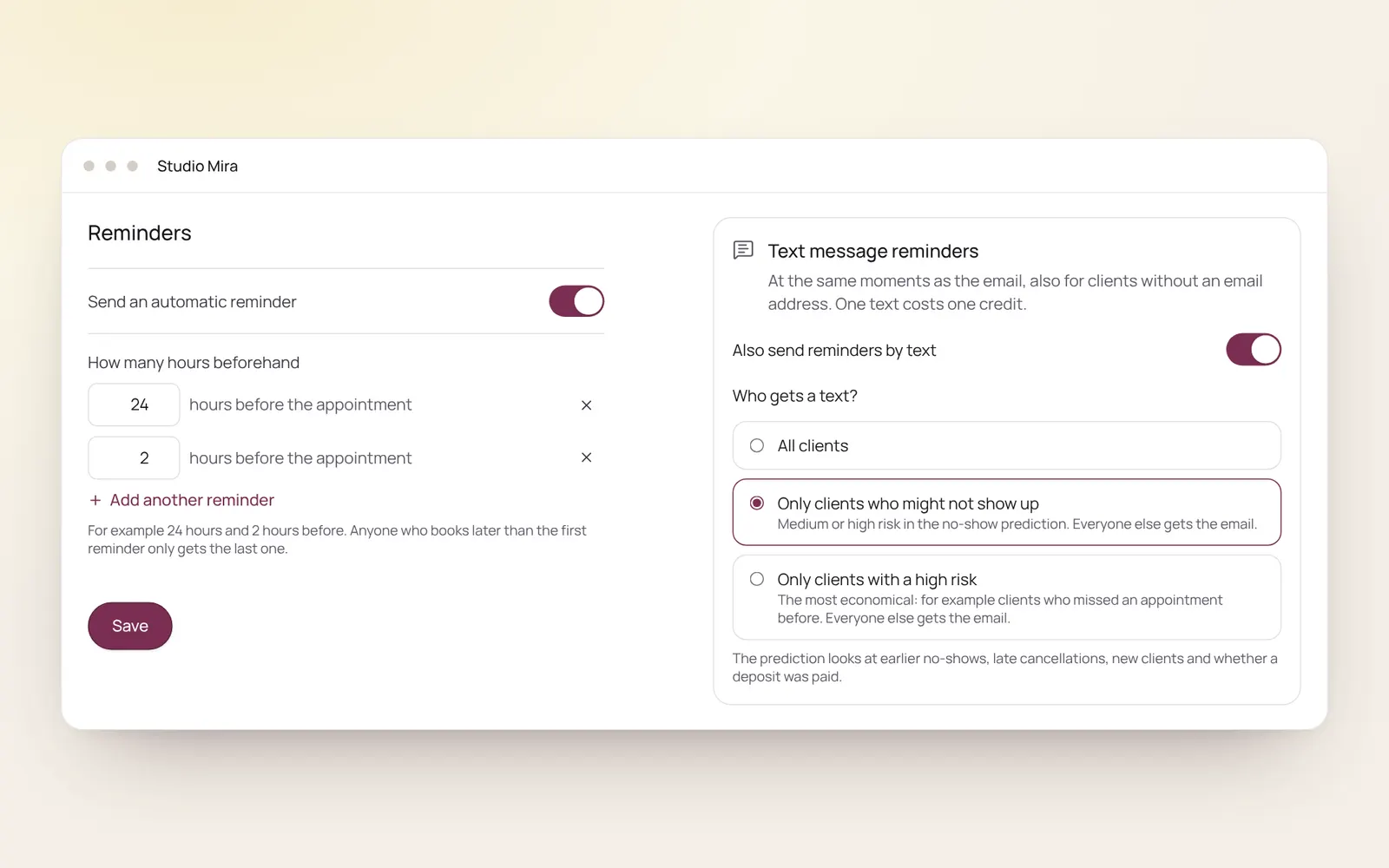
So funktioniert es
- Switch on Send automatic reminder and choose how many hours before the appointment, for example 24 hours and 2 hours.
- Add another reminder adds one more.
- Someone who books after the first reminder would have gone only gets the later one.
- What the email says is changed under Client emails.
Passende Anleitungen
- CampaignsAn email to a group of clients in your own branding. Only goes to clients who gave consent for offers and have an email address.
- AutomationsEverything NOZAIA sends to your clients by itself
- RebookingWho is due for another appointment, based on their own rhythm
- Atelier: designing Instagram postsCreate Instagram posts and stories in your own brand style, with thirty templates, your own photos and your brand colours. You download it as PNG or JPG and post it yourself.
Hat dir diese Anleitung geholfen?
Kommst du nicht weiter?
Öffne in NOZAIA den Support unten in der Seitenleiste (auf dem Handy: im Menü unter deinem Namen). Er weiß, auf welchem Bildschirm du bist, und wenn er nicht helfen kann, geht deine Frage an unser Team.
Zuletzt geprüft am 29. September 2026