



Reminders
The automatic reminder on or off
Where to find it
Where to find itSettings → Marketing and messages → Reminders
How it works
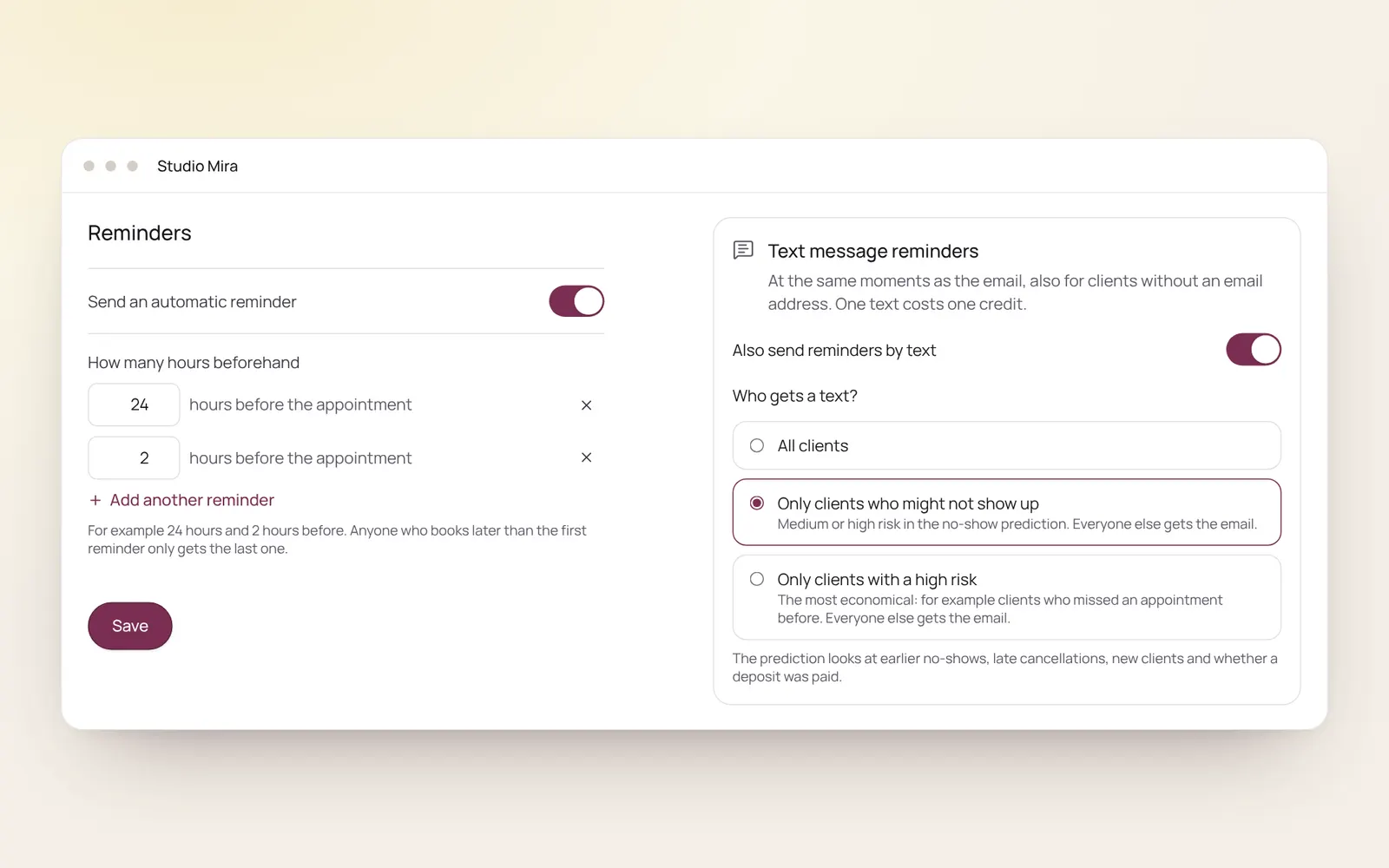
- Switch on Send automatic reminder and choose how many hours before the appointment, for example 24 hours and 2 hours.
- Add another reminder adds one more.
- Someone who books after the first reminder would have gone only gets the later one.
- What the email says is changed under Client emails.
Related guides
- CampaignsAn email to a group of clients in your own branding. Only goes to clients who gave consent for offers and have an email address.
- AutomationsEverything NOZAIA sends to your clients by itself
- RebookingWho is due for another appointment, based on their own rhythm
- Atelier: designing Instagram postsCreate Instagram posts and stories in your own brand style, with thirty templates, your own photos and your brand colours. You download it as PNG or JPG and post it yourself.
Did this guide help?
Still stuck?
In NOZAIA, open Support at the bottom of the sidebar (on your phone: in the menu under your name). It knows which screen you're on, and if it can't help, your question goes to our team.
Last checked 29 September 2026