



Deposit for online bookings
Ce guide est en anglais.
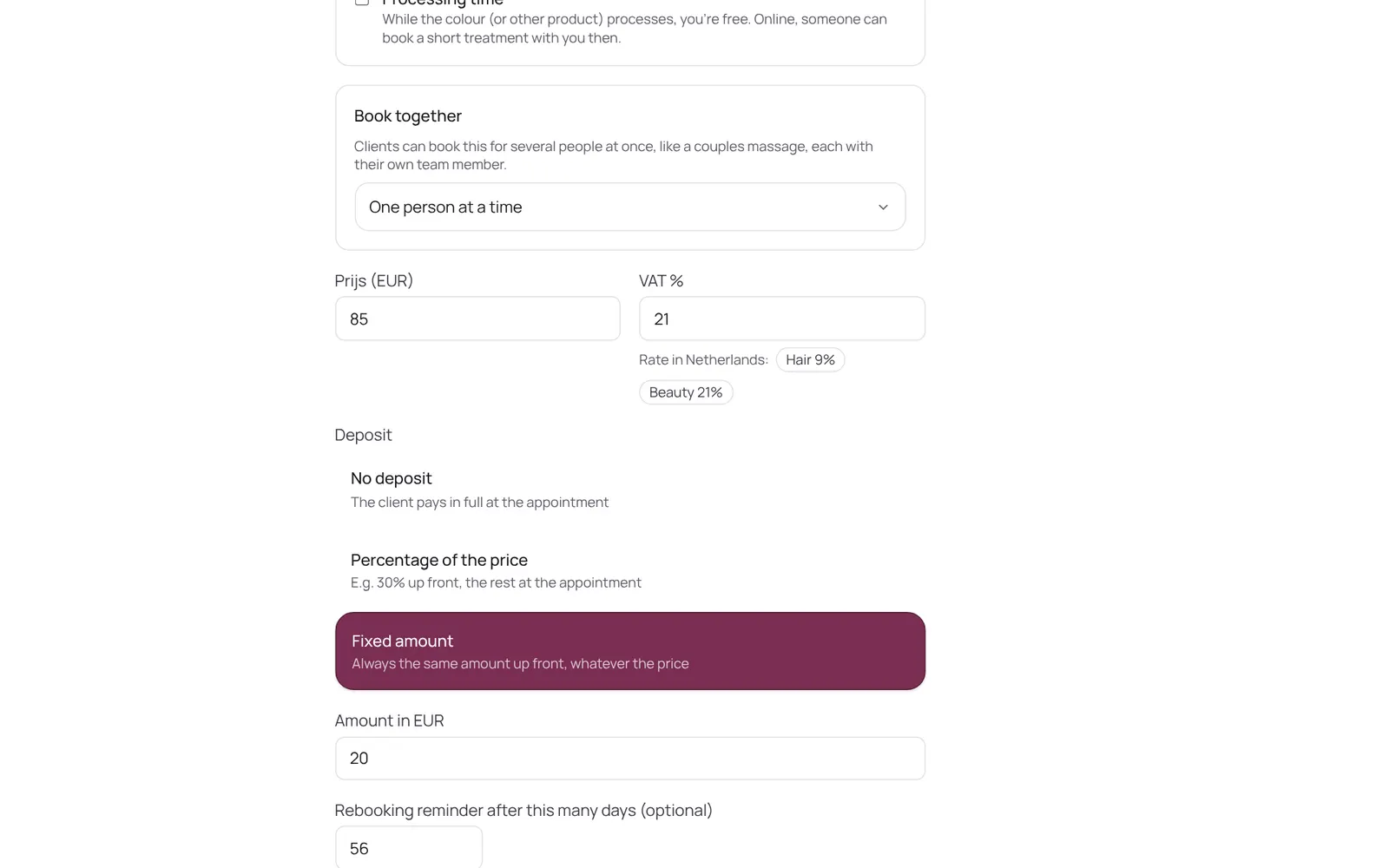
A client pays part or all of the amount when booking online. Set per treatment: none, a percentage or a fixed amount. The money goes straight to your own account, not through NOZAIA.
Où le trouver
Comment ça marche
- First connect your payment provider (Settings → Payments → Receiving payments).
- Then per treatment at Settings → Sales → Services → the treatment → deposit.
- Who pays the deposit is chosen at Settings → Online → Online booking → Who do you ask a deposit from: Everyone, Only new clients (anyone who has been before books without one, recognised by email, phone number or logging in), or New clients and anyone who missed an appointment before.
Bon à savoir
- Les membres de l’équipe ont besoin de l’autorisation « Services and prices ». Le propriétaire la règle dans Settings → Team → Roles and permissions (l’app est en anglais).
À configurer d’abord
Si quelque chose ne marche pas
I can't set a deposit.
A deposit only works once your payment provider is connected. In countries where NOZAIA can't offer online payments (China, South Korea, Serbia) deposits don't exist; the subscription is 15% cheaper there.
A regular client didn't have to pay a deposit.
Check Settings → Online → Online booking → Who do you ask a deposit from. If it says Only new clients, anyone who has been before books without a deposit. Choose Everyone if you want it from every client.
Guides associés
- Creating or changing a treatmentA treatment has a name, a category, a price, a duration and a buffer. The duration is the time with the client; the buffer is the time after it to tidy up or prepare, which the calendar keeps free but the client doesn't see. Also: a photo (optional; it then shows with the treatment on your mini website and in the booking screen, and without a photo nothing shows), who does it, extras and finishes, a calendar colour, a deposit, a from-price and whether it can be booked online.
- CheckoutChecking out an appointment or a separate sale: the cart, discount, a gift card or stamp card, and the payment method (card, cash, transfer, QR code, or split). An invoice is made.
- Paying with a QR code at the counterThe client scans a QR code with their own phone and pays online, with your own payment provider (Stripe or Sentoo). It can also be shown on your own phone.
Ce guide vous a-t-il aidé ?
Vous êtes bloqué ?
Dans NOZAIA, ouvrez le Support en bas de la barre latérale (sur téléphone : dans le menu sous votre nom). Il sait sur quel écran vous êtes, et s’il ne peut pas aider, votre question part à notre équipe.
Vérifié le 17 octobre 2026