



Events report
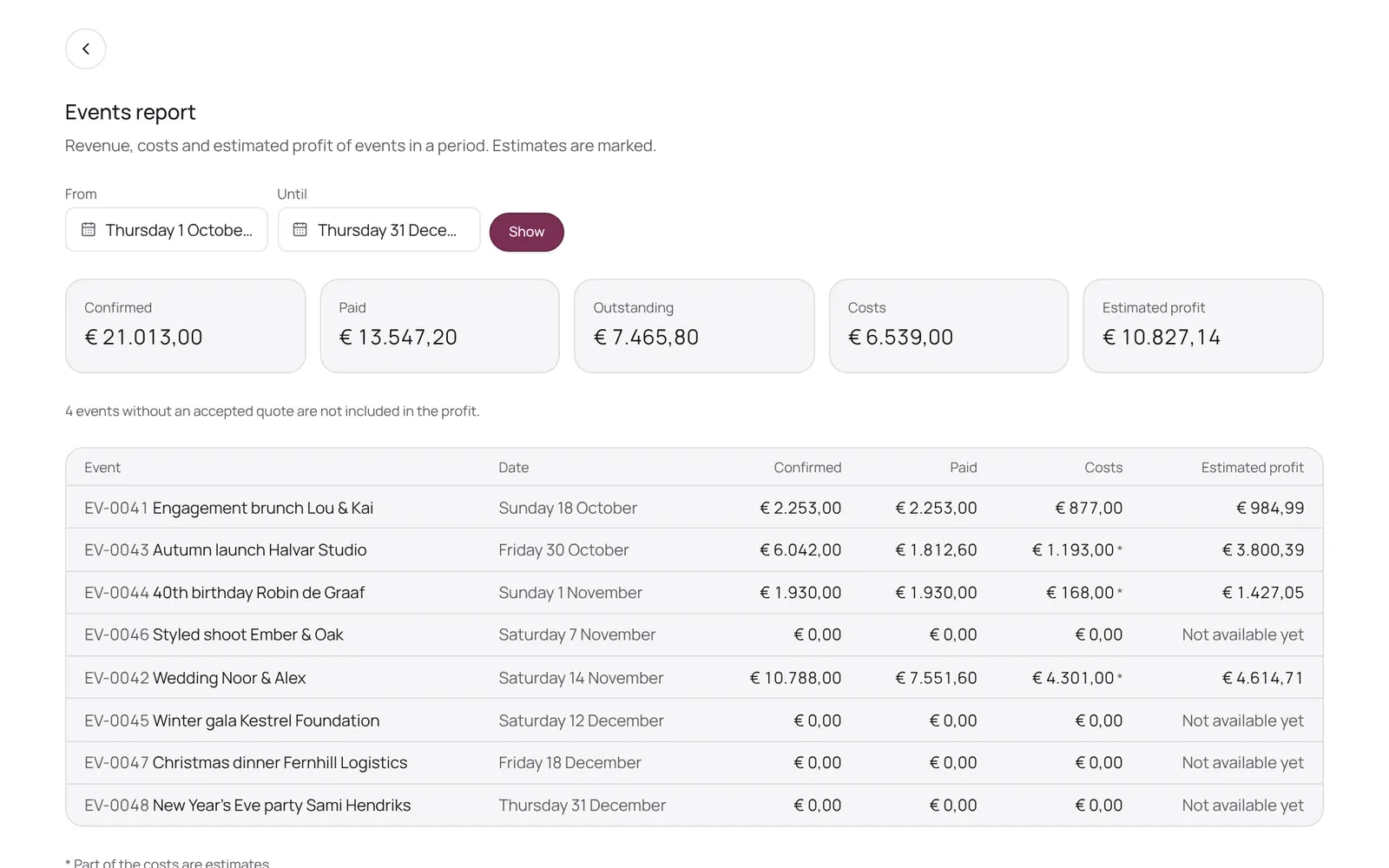
Revenue, costs and estimated profit per period
Where to find it
Where to find itEvents → Report
How it works
- Pick a period and see per event the confirmed revenue, what has been paid, the costs and the estimated profit (excluding VAT), with totals above and revenue per package and rental item below.
- You enter costs on the event itself, in the Revenue, costs and profit block; supplier costs come from the suppliers.
- An event without an accepted quote is not included in the profit.
- Only for those who may see the business figures or manage payments.
Good to know
- Team members need the permission “Events”. The owner sets this under Settings → Team → Roles and permissions.
Related guides
- OverviewThe NOZAIA Events overview: upcoming events, new inquiries, what is in the quote stage, today's tasks and what is overdue. Only for a business that picked an event type under Business type (planning, rentals, styling or venue).
- My dayYour events, runs and tasks for today and the coming week
- InquiriesWhat comes in through your site, and what you note yourself
- QuotesQuotes per event: send, acceptance, payment schedule
Did this guide help?
Still stuck?
In NOZAIA, open Support at the bottom of the sidebar (on your phone: in the menu under your name). It knows which screen you're on, and if it can't help, your question goes to our team.
Last checked 11 October 2026